How to Use *67 to Hide Your Number: A Simple Guide (2026)
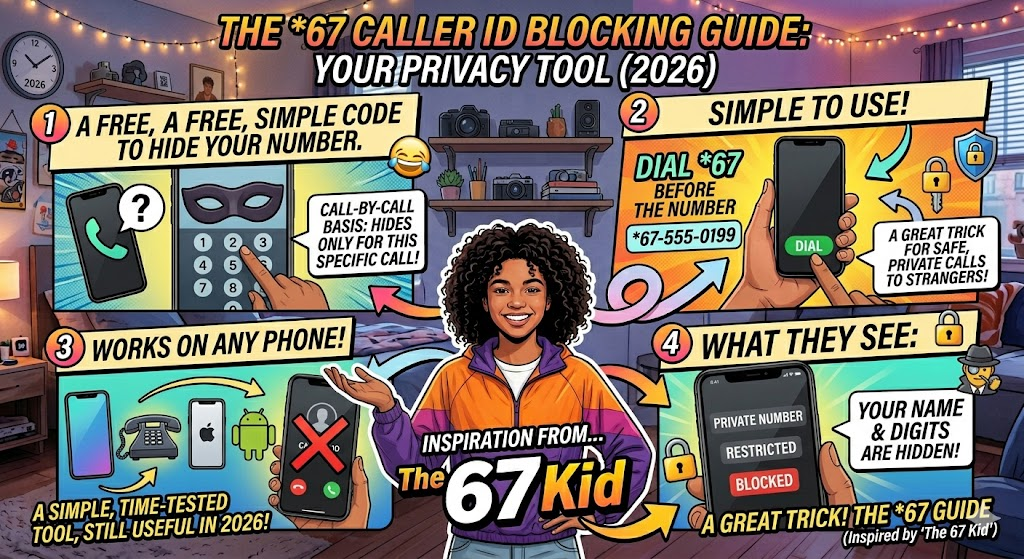
Have you ever wanted to make a call without showing your personal phone number? That is exactly what *67 does. It is a simple code you dial before a phone number to hide your identity. When you use it, the person you are calling will not see your name or digits. Instead, their screen might say “Private Number,” “Restricted,” or “Blocked.” This tool has been around for a long time. It works on landlines and modern smartphones like iPhones and Androids. It is a free way to stay safe when calling someone you do not know well.
Using *67 is very easy for anyone to do. You just open your keypad and type the code first. For example, if you want to call 555-0199, you would dial *675550199. It works on a call-by-call basis. This means your number is only hidden for that specific call. The next time you call normally, your ID will show up again. It is a great trick to keep in your back pocket for privacy.
Why You Should Use *67 for Privacy
Privacy is very important in our digital world today. Many people use *67 to protect their personal information. Think about when you call a stranger from an online marketplace. You might not want them to have your cell phone number forever. Using this code keeps your data private. It acts like a digital shield between you and the person on the other end. It is one of the most trusted ways to keep your life a bit more secret.
Another reason to use *67 is for business calls. If you work from home, you might use your personal phone to reach clients. You probably do not want clients calling your personal line at dinner time. By hiding your ID, you maintain a professional boundary. It helps you control who has access to your direct line. It is a smart move for anyone who values their quiet time and personal space.
Detailed Table: Quick Guide to Phone Privacy Codes
| Feature | Code to Use | What It Does | Best For |
| Hide Number | *67 | Blocks your Caller ID | Single calls to strangers |
| Show Number | *82 | Unblocks your ID | Calling people who block private calls |
| Check Last Call | *69 | Tells you who last called | Finding out who just rang you |
| Call Trace | *57 | Traces a harassing call | Legal or safety issues |
Step-by-Step: Using *67 on an iPhone or Android
Using *67 on a smartphone is just like using it on an old house phone. First, open your phone app and go to the keypad. Type the star key, then the numbers six and seven. After that, type the full area code and the phone number. Press the green call button to start the conversation. The receiver will see a restricted message. This works on almost every major carrier in the country. It is a built-in feature that does not require any special apps.
Some people think they need fancy software to hide their ID, but *67 is all you need. It is important to remember that this does not work for toll-free numbers or emergency services. If you call 911, they will always see your location and number for safety. But for regular calls to friends or businesses, it works perfectly. Many users find this much faster than digging through their phone settings to find the “Hide ID” toggle.
Does *67 Work on All Carriers?
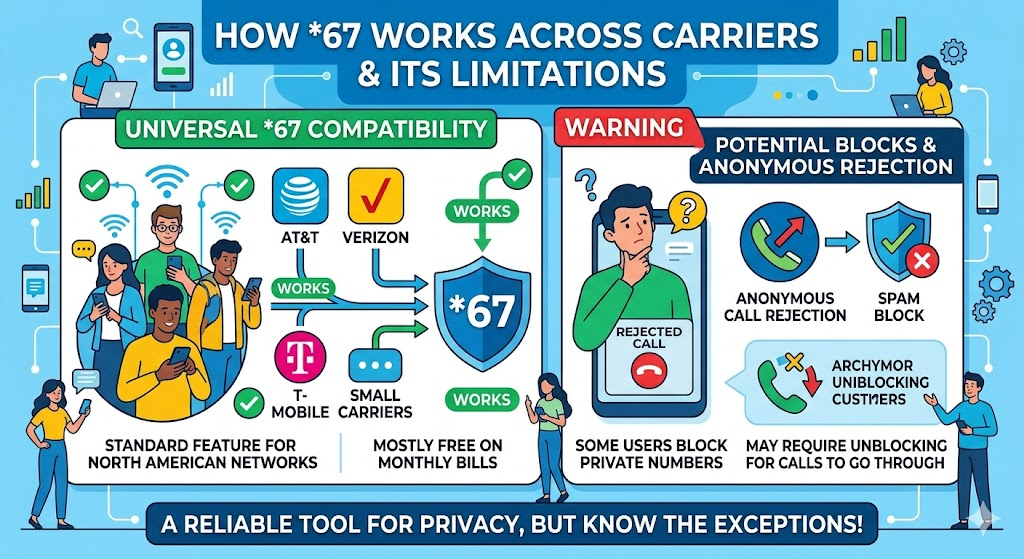
Most major cell phone companies support *67 without any issues. Whether you use Verizon, AT&T, or T-Mobile, the code remains the same. It is a universal standard for North American phone systems. Some smaller carriers also allow it for free. You do not usually have to pay extra on your monthly bill to use this feature. It is a standard part of the telecommunications network. This makes it a very reliable tool for everyone.
However, you should know that some people block private calls. If a person has “Anonymous Call Rejection” turned on, your call with *67 might not go through. They will hear a recording saying you must unblock your number to reach them. In that case, you would have to call back without the code. It is a way for people to avoid telemarketers and spam. Even so, *67 is still the best first step for hiding your identity.
The Difference Between *67 and Permanent Blocking
If you find yourself using *67 every single day, you might want a permanent fix. You can go into your phone settings to hide your number for every call. On an iPhone, this is under “Show My Caller ID” in the phone settings. On Android, it is often in the “Supplementary Services” menu. This is different from the code because it stays on until you turn it off. *67 is better if you only want to be private once in a while.
Permanent blocking can be a bit annoying because your friends might not answer. They see a “Private” call and think it is a scammer. That is why *67 is so popular. It gives you the power to choose when to be invisible. You can be public with your family but private with a local shop. Having this choice makes managing your digital footprint much easier and more flexible.
Common Myths About Hidden Calling Codes
There are many myths about *67 that we should clear up. Some people think it makes you completely untraceable to the law. This is not true. Your phone company still has a record of the call you made. If a crime is committed, authorities can still find the source. This code is for personal privacy, not for doing things that are against the law. It is meant to protect you from regular people seeing your digits.
Another myth is that *67 costs money every time you dial it. For most regular phone plans, this is a free service. It was designed to be a basic part of how phones work. You should not see any weird charges on your bill for using it. Just make sure you are dialing the code correctly. If you mess up the digits, the call might go through with your number visible. Always double-check your screen before hitting the dial button.
When *67 Will Not Protect You
It is vital to know the limits of *67 before you rely on it. As mentioned before, you cannot hide from 911 or emergency operators. They need your info to help you in a crisis. Also, you cannot use this code when calling 800 or 888 numbers. These are “toll-free” lines. The person paying for the call has a right to see who is calling them. They use a system called ANI that ignores the privacy code.
You also cannot use *67 to bypass a block. If someone has blocked your specific phone number, hiding your ID might not work. Many modern phones are smart enough to block “Private” callers automatically. If your call keeps going to voicemail, they might have a filter for hidden numbers. In these cases, using the code will not help you reach them. It is best to respect people’s boundaries if they do not want to talk.
Tips for Using *67 Safely and Effectively
To get the best results with *67, always dial carefully. It is easy to miss the star key if you are in a rush. I always suggest typing the full string of numbers out first before hitting call. This ensures the code is attached to the number correctly. Also, remember that this code does not hide your number on text messages. If you send a text, your number will always show up. *67 only works for voice calls.
Another tip is to use *82 if you ever need to reverse the process. If you have permanent blocking on, but need to call a doctor who rejects private calls, dial *82. This “unblocks” you for just that one call. Understanding these two codes makes you a pro at managing your phone. It puts you in total control of your caller ID and your personal data.
How to Block Your Number on Landlines
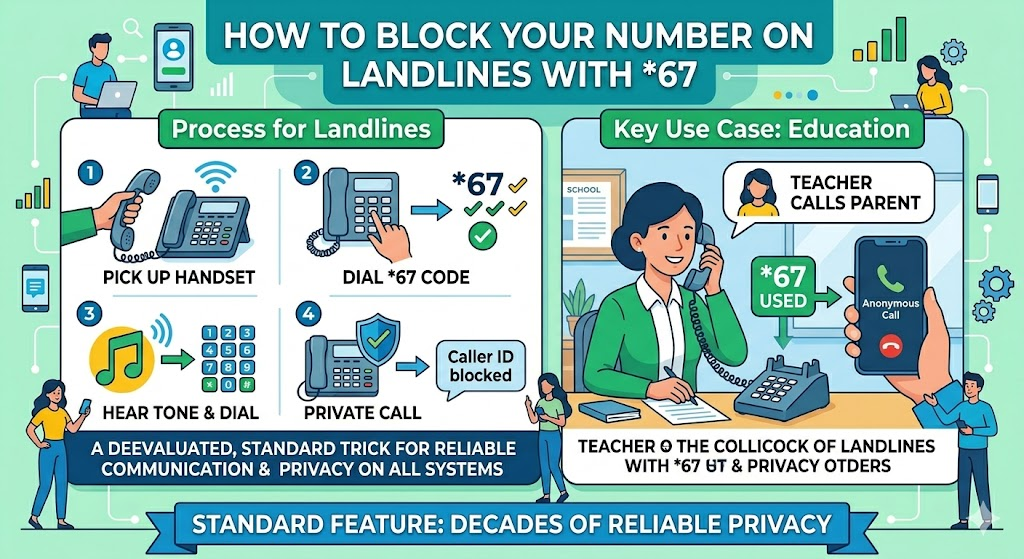
Even though most people use cell phones, landlines still exist in many homes and offices. The good news is that *67 works exactly the same way on a landline. You pick up the handset, wait for the dial tone, and press the code. After the code, you will hear a quick stutter tone or silence. Then, you dial the number you want to reach. It is a feature that has worked for decades.
For businesses using old-school phone systems, this is a life saver. If a teacher is calling a parent from a school landline, they might use *67. This prevents the parent from having the direct office line. It keeps the school’s communication organized. Whether the tech is old or new, this privacy trick remains a standard tool for everyone.
Frequently Asked Questions
1. Is it legal to use *67?
Yes, it is perfectly legal to use this code. It is a feature provided by phone companies for privacy. Just do not use it to harass or threaten people.
2. Can someone find out who called from *67?
A regular person cannot see your number if you use the code. However, the phone company and law enforcement can still see the records if necessary.
3. Does *67 work for text messages?
No, it does not. If you send a text message, your phone number will always be visible to the person receiving it.
4. Why did my *67 call not go through?
The person you are calling might have “Anonymous Call Rejection” enabled. This means their phone automatically hangs up on hidden numbers.
5. Is there a charge for using *67?
For almost all modern carriers, this service is free. It is a standard feature included with your phone line.
6. Does *67 work on international calls?
It mostly works within the United States and Canada. International phone systems often use different codes for privacy.
Conclusion
In conclusion, *67 is a powerful and simple tool for anyone. It helps you stay safe, keep your work life separate, and protect your data. In a world where everyone wants your information, having a way to stay private is a big win. It is free, easy to use, and works on almost any phone. Next time you need to make a call to a stranger, give it a try. You will feel much better knowing your personal digits are safe and sound!
Do you have any other tips for staying private on your smartphone? Staying informed is the best way to keep your digital life secure. Start using these simple codes today and take back your privacy!